
MiniCPM-OCR Online: Fast OCR for Images & PDFs to Text and Excel
Upload an image or PDF and extract text and tables to Excel online. No GPU or installation needed — sign in with free credits to convert.
- Free to try
- Sign in with free credits to convert
- No installation required
What is MiniCPM-OCR?
MiniCPM-OCR 1.0 is an open-source document OCR model that OpenBMB released on October 27, 2026. It is the first OCR-specialised model in the MiniCPM-V family. With 1.3 billion parameters, MiniCPM-OCR is small enough to run on a single consumer GPU, and even on a CPU with llama.cpp.
Built on MiniCPM-V 4.6, MiniCPM-OCR reads Chinese and English documents, including scans, phone photos, curved and skewed pages, and returns Markdown, with tables as HTML and formulas as LaTeX.
MiniCPM-OCR quick facts
| MiniCPM-OCR 1.0 | |
|---|---|
| Publisher | OpenBMB (with ModelBest) |
| Released | October 27, 2026 |
| Size | 1.3B parameters |
| Companion model | MiniCPM-OCR Jev (2B), an OCR quality checker |
| Languages | Chinese and English |
| Tasks | Text, tables, formulas, charts, seals, key information (JSON) |
| License | Apache-2.0 (commercial use allowed) |
| Run it with | vLLM, SGLang, llama.cpp (GGUF), Ollama, Transformers |
| OpenBMB demo | ModelBest playground |
| Page last updated | October 30, 2026 |
How to Use MiniCPM-OCR Online
- 1
Upload Your File
Drag an image or PDF into the box above, or click Attach file. MiniCPM-OCR online accepts JPG, JPEG, PNG, WEBP and PDF files. Upload limits depend on your account, and page limits can vary by plan.
- 2
Click Run OCR
We read the page and rebuild text, tables and formulas into structured rows.
- 3
Copy or Download the Result
Check the text and tables, then download Excel. Sign in with a free account to convert; daily free credits apply, and paid credits are available for more volume.
Uploaded files are processed to provide the OCR you request. Our Privacy Policy explains how files are handled and retained.
What can MiniCPM-OCR read?
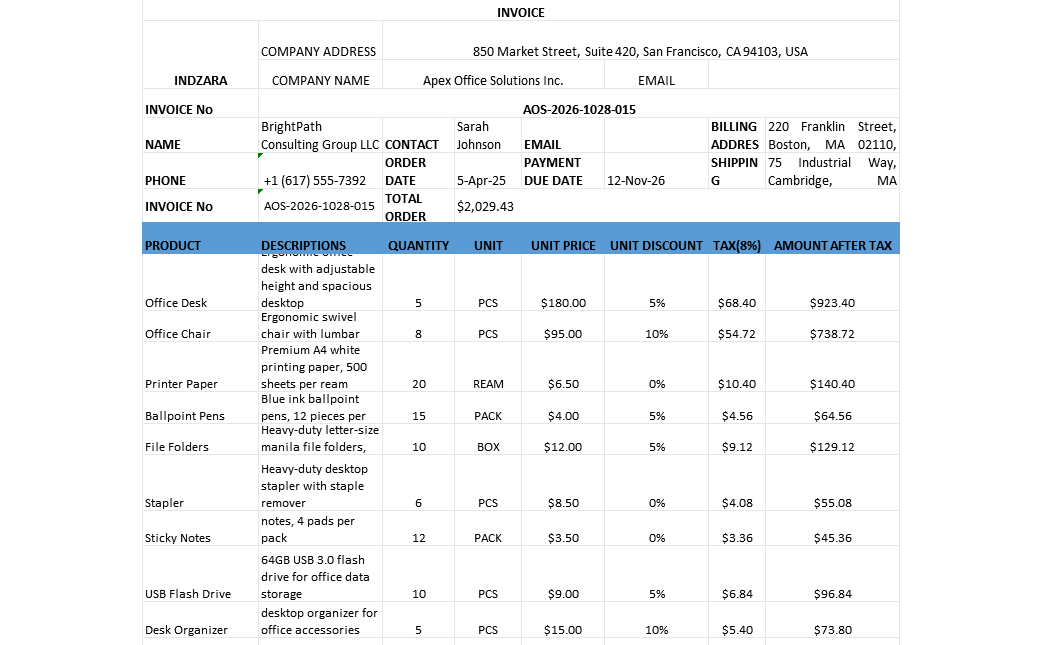
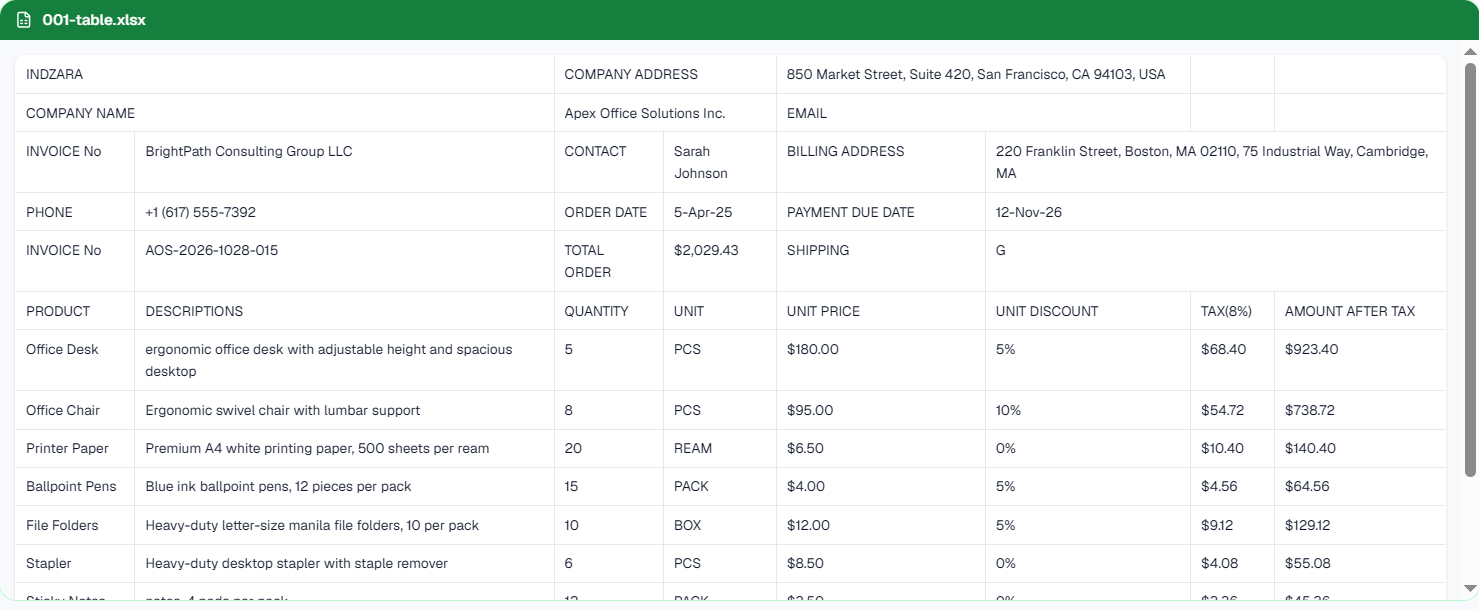
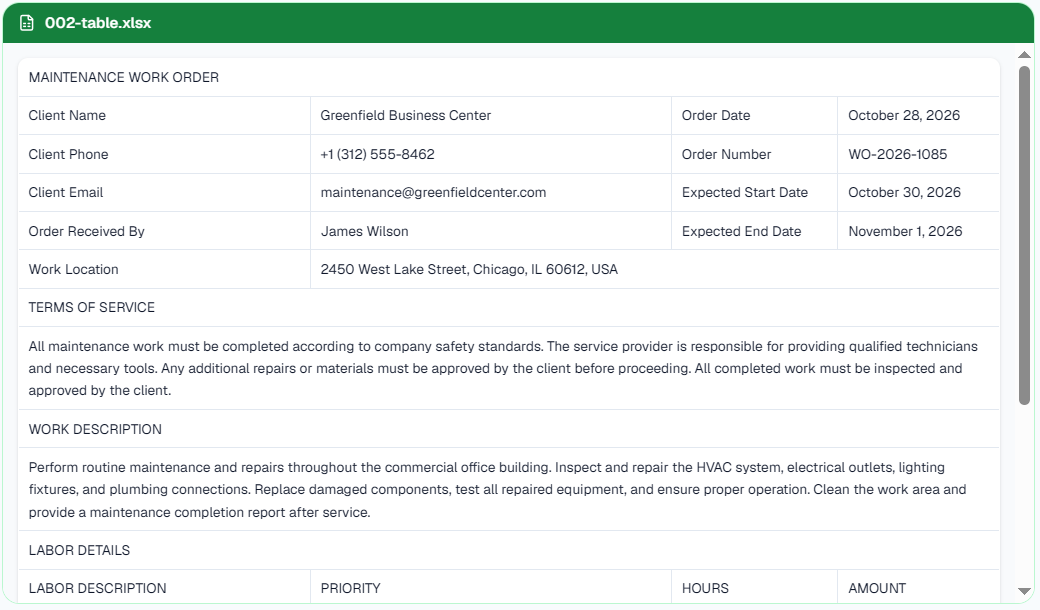
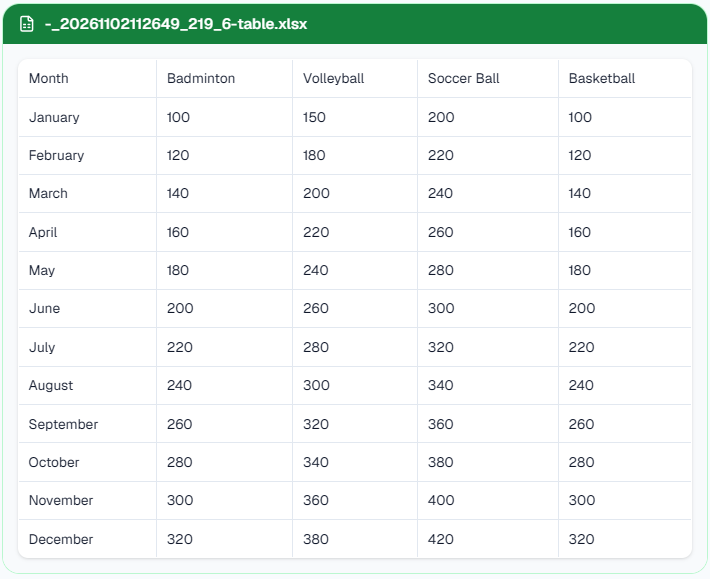
Tables and financial statements. MiniCPM-OCR keeps rows and columns, so tables become a clean spreadsheet.
Receipts and invoices. Merchant, date, line items and totals come through as text and tables.
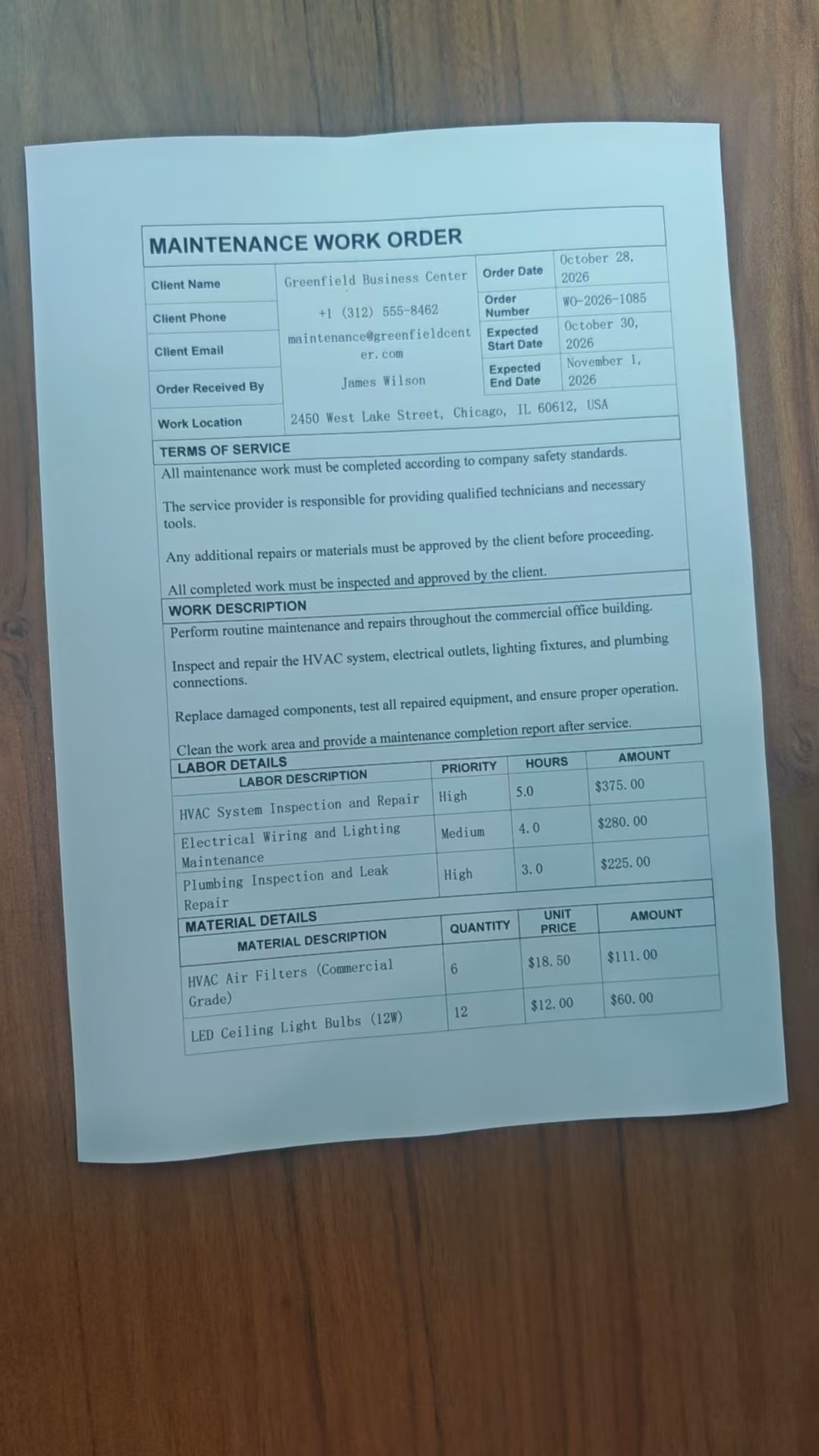
Messy phone photos. Tilted, curved or recaptured pages are a stated focus of the model.
Handwritten notes. OpenBMB's examples include neat English and Chinese handwriting.
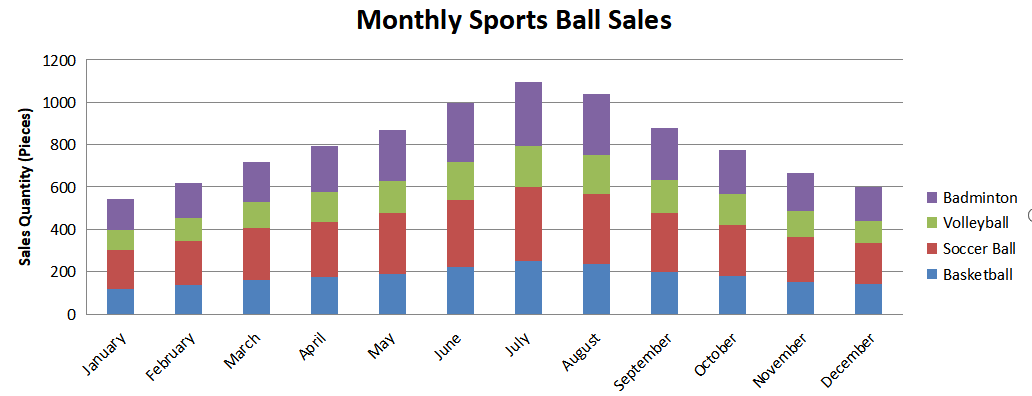
Formulas and charts. Formulas come back as LaTeX, and chart numbers can be read into a table.
Seals and stamps on Chinese documents.
Why Use MiniCPM-OCR Online?
MiniCPM-OCR is a fast open-source OCR model from OpenBMB. Self-hosting still needs a GPU or llama.cpp setup. This page gives you online extraction to Excel without installing anything — useful for finance teams, students, and developers evaluating document workflows. The live converter uses our document-extraction pipeline; it does not guarantee each request loads the MiniCPM weights.
MiniCPM-OCR Jev: Check If Your OCR Is Right
The hardest OCR errors look right: a part number "SKU-80O" read as "SKU-800" is still valid text, so nothing warns you. OpenBMB ships a second model for exactly this problem.
MiniCPM-OCR Jev is a 2B companion model that OpenBMB released alongside MiniCPM-OCR 1.0. Jev does not read documents itself. You give it a cropped text, formula or table region and a candidate OCR result, and it returns a score from 0 to 1. A higher score means the result is more likely correct. Jev works on output from any OCR model, not only MiniCPM-OCR.
Use the score to accept reliable regions automatically and send the rest to a person, or run several OCR models on the same region and keep the highest-scoring result. OpenBMB recommends choosing the threshold with samples from your own documents.
MiniCPM-OCR Jev quick facts
| MiniCPM-OCR Jev | |
|---|---|
| What it does | Scores OCR results for text, formula and table regions. It does not perform OCR. |
| Input | The original region image plus a candidate OCR result |
| Output | A score from 0 to 1 (higher = more likely correct) |
| Size | 2B parameters, trained from Qwen3.5-2B with a binary classification head |
| License | Apache-2.0 |
| Formats | BF16, GGUF (llama.cpp, Ollama), AWQ and GPTQ 4-bit |
| Weights | openbmb/MiniCPM-OCR-Jev and openbmb/MiniCPM-OCR-Jev-gguf on Hugging Face |
MiniCPM-OCR Jev benchmark scores (AUROC)
OpenBMB reports Jev's results as AUROC (×100) on its JevOCRBench. AUROC measures how well the score ranks correct OCR results above incorrect ones. It is not an OCR accuracy figure.
| AUROC (×100) | |
|---|---|
| Overall | 93.6 |
| Text regions | 94.6 |
| Formula regions | 93.1 |
| Table regions | 91.1 |
For comparison, OpenBMB lists JEV-35B-A3B at 90.1 and Qwen3.5-397B-A17B at 93.8 overall. On 200 samples parsed by four OCR models, Jev's AUROC (×100) ranged from 91.9 to 93.4. These numbers are self-reported. Source: MiniCPM-OCR Jev model card.
Turn MiniCPM-OCR tables into Excel
MiniCPM-OCR itself returns tables as HTML or Markdown. This page converts them for you: click Download Excel to get an .xlsx file with rows and columns kept. For other workflows, use our image to Excel converter or PDF to Excel converter.
Run MiniCPM-OCR with Ollama and llama.cpp (GGUF)
MiniCPM-OCR supported Ollama and llama.cpp from day one. The GGUF weights are about 1.4 GB plus an 859 MB vision projector, and they run with 16 GB of RAM on an AVX2 CPU or a GPU. This is the easiest way to run MiniCPM-OCR on a laptop and keep documents offline.
How to run MiniCPM-OCR on a server
vLLM:
vllm serve openbmb/MiniCPM-OCR-1.0 --served-model-name MiniCPM-OCR --trust-remote-code --max-model-len 40960, then call the OpenAI-compatible API.SGLang and Transformers: for custom pipelines and fine-tuning with LLaMA-Factory or ms-swift.
Python SDK:
pip install minicpm-ocradds a full-page pipeline that detects layout with PP-DocLayoutV3, then reads each block.
MiniCPM-OCR uses short task prompts such as Text Recognition:, Table Recognition: and Chart to Table:. Turn thinking mode off for plain OCR. The MiniCPM-OCR FAQ on GitHub lists strict CUDA 13 driver requirements for the vLLM setup, so expect some install work, or use the tool on this page instead.
Code and weights: MiniCPM-OCR on GitHub and openbmb/MiniCPM-OCR-1.0 on Hugging Face.
Who should use MiniCPM-OCR?
Finance and accounting. Read bank statements, invoices and receipts, then move the numbers into a spreadsheet. Our bank statement to Excel and receipt to Excel guides show the workflow.
Research and education. Digitize papers with formulas and charts.
Business documents. Process Chinese or English contracts and stamped forms.
Developers. Test MiniCPM-OCR here, then add it as a small, fast OCR step in an app or RAG pipeline.
MiniCPM-OCR vs PaddleOCR-VL, olmOCR and Unlimited OCR 2
OpenBMB reports that MiniCPM-OCR scores 93.68 on Real5-OmniDocBench and 54.7 on OCRBench v2, and processes about 1.2 pages per second on one RTX 5090. The authors put its throughput at about 1.5 times PaddleOCR-VL-1.6 and 3.6 times MinerU2.5 Pro. These numbers are self-reported.
On Reddit, users noted that olmOCR scores around 82 on olmOCR-Bench and called MiniCPM-OCR's speed-to-quality ratio its strength. Baidu's Unlimited OCR 2 is a larger 3B mixture-of-experts model built for documents hundreds of pages long. Choose MiniCPM-OCR for fast single pages, modest hardware and Chinese or English text. Choose Unlimited OCR 2 for very long files.
Both models run on this site: try Unlimited OCR 2 online for long PDFs.
Is MiniCPM-OCR free for commercial use?
Yes, the model is free for commercial use. OpenBMB releases MiniCPM-OCR, including code and weights, under the Apache-2.0 license. This online tool follows the same free credits and plans as the rest of ImageToExcel.
Limitations to keep in mind
OpenBMB documents MiniCPM-OCR for Chinese and English only. Other languages may give weaker results.
Handwriting inside printed forms and mixed page orientations are harder cases that OpenBMB has not benchmarked separately.
A small model can still misread low-quality photos. Shoot pages flat and in good light, and check totals and IDs before you use the numbers.
MiniCPM-OCR is built for single pages, so for documents hundreds of pages long, Unlimited OCR 2 is the better fit.
FAQ
Where can I find the MiniCPM-OCR code and weights?
The code is on GitHub at OpenBMB/MiniCPM-OCR and the weights are on Hugging Face at openbmb/MiniCPM-OCR-1.0.
Is there a MiniCPM-OCR Hugging Face Space?
OpenBMB's own demo is the ModelBest playground. The Hugging Face team also built a Space, hugging-apps/minicpm-ocr, and OpenBMB has asked for it to be transferred to them.
Is MiniCPM-OCR online free?
You can try online extraction with a free account and limited daily credits. Sign in is required to upload and convert. Buy more credits when you need higher volume.
What files and sizes can I upload?
JPG, JPEG, PNG, WEBP and PDF. Upload limits depend on your account, and page limits can vary by plan.
Does MiniCPM-OCR support languages other than Chinese and English?
Only Chinese and English are documented. Test other languages on a short file first.
Can I run MiniCPM-OCR on a Mac or a CPU?
Yes, through the GGUF weights with llama.cpp or Ollama and about 16 GB of RAM. A native MLX build is not available yet.
Does MiniCPM-OCR handle handwriting and rotated scans?
OpenBMB's examples include neat handwriting and skewed or curved pages. Very messy handwriting may need review.
Can MiniCPM-OCR extract images from a document?
It reads text, tables, formulas, charts and seals. Exporting embedded pictures as files is not supported.
Are my files private?
Uploaded files are processed to provide the OCR you request, as described in our Privacy Policy. For fully offline invoices, run the open weights yourself.
How do I know if MiniCPM-OCR got it right?
Compare totals, dates and IDs with the source. Developers can also score results with MiniCPM-OCR Jev, which rates each region from 0 to 1.
Can MiniCPM-OCR export to Excel?
Yes. On this page, Run OCR builds an editable .xlsx you can download. Self-hosted MiniCPM-OCR usually emits HTML tables; our online converter uses ImageToExcel's extraction pipeline and exports Excel directly.
MiniCPM-OCR or Unlimited OCR 2?
Choose MiniCPM-OCR for speed and single pages, and Unlimited OCR 2 for very long multi-page documents.
Does MiniCPM-OCR Jev do OCR?
No. Jev does not read text from images. It scores OCR results that another model produced, such as MiniCPM-OCR, so you can decide which results to trust.
Is MiniCPM-OCR Jev free, and where can I download it?
Yes. OpenBMB releases the weights under Apache-2.0 on Hugging Face at openbmb/MiniCPM-OCR-Jev, with a GGUF build at openbmb/MiniCPM-OCR-Jev-gguf for llama.cpp and Ollama.
Run MiniCPM-OCR Online
Upload an image or PDF and get text and Excel in one click.