
Unlimited OCR 2 Online: Baidu OCR for Images & PDFs to Text and Excel
Upload long documents and extract text and tables to Excel online. No GPU or installation needed — sign in with free credits to convert.
- Free to try
- Sign in with free credits to convert
- No installation required
What is Unlimited OCR 2?
Unlimited OCR 2 is an open-source OCR model from Baidu's ERNIE team, released on October 27, 2026. It reads very long documents, from one page to hundreds of pages, and turns them into structured Markdown with tables. When people search for "Baidu OCR" or "Baidu Unlimited OCR" today, this is usually the model they mean.
Unlimited OCR 2 pairs a DeepEncoder vision encoder with a mixture-of-experts decoder: about 3 billion parameters in total, with roughly 0.5 billion active per token.
Unlimited OCR 2 quick facts
| Unlimited OCR 2 | |
|---|---|
| Publisher | Baidu (ERNIE team) |
| Released | October 27, 2026 |
| Size | About 3B parameters (MoE), about 0.5B active |
| Focus | Long, multi-page documents |
| Output | Markdown with tables |
| License | MIT (commercial use allowed) |
| Supported runtimes | Transformers, SGLang (NVIDIA GPU) |
| Community builds | GGUF, mlx-vlm |
| Hosted API | Baidu AI Cloud document parsing |
| Baidu's demo | Hugging Face Space baidu/Unlimited-OCR-2 |
Unlimited OCR vs Unlimited OCR 2
The first Unlimited OCR, released in June 2026, extended the DeepSeek-OCR approach to multi-page input, up to around 40 pages. Unlimited OCR 2 replaces its sliding-window attention with SR-SWA, which keeps a small, fixed set of working references while decoding.
| Unlimited OCR (v1) | Unlimited OCR 2 | |
|---|---|---|
| Released | June 2026 | October 2026 |
| Long-document method | R-SWA | SR-SWA |
| Practical length | Around 40 pages | Hundreds of pages |
Baidu reports that at hundred-page scale, Unlimited OCR 2 decodes each step about 7 times faster than full attention and 5.6 times faster than v1. Peak key-value cache memory falls from 47 GB to under 2 GB.
"Unlimited OCR" is also a generic phrase used by unrelated free OCR websites. This page is about Baidu's model.
How to Use Unlimited OCR 2 Online
- 1
Upload Your File
Drag an image or PDF into the box above, or click Attach file. Unlimited OCR 2 online accepts JPG, JPEG, PNG, WEBP and PDF files. Upload limits depend on your account, and page limits can vary by plan.
- 2
Click Run OCR
We read each page in order and rebuild text, headings and tables into structured rows.
- 3
Copy or Download the Result
Check the text and tables, then download Excel. Sign in with a free account to convert; daily free credits apply, and paid credits are available for more volume.
Uploaded files are processed to provide the OCR you request. Our Privacy Policy explains how files are handled and retained.
What Unlimited OCR 2 is good at
Long reports, contracts and books. Unlimited OCR 2 reads many pages in one request without running out of memory.
Scanned PDF backlogs. Old scans become searchable, editable text.
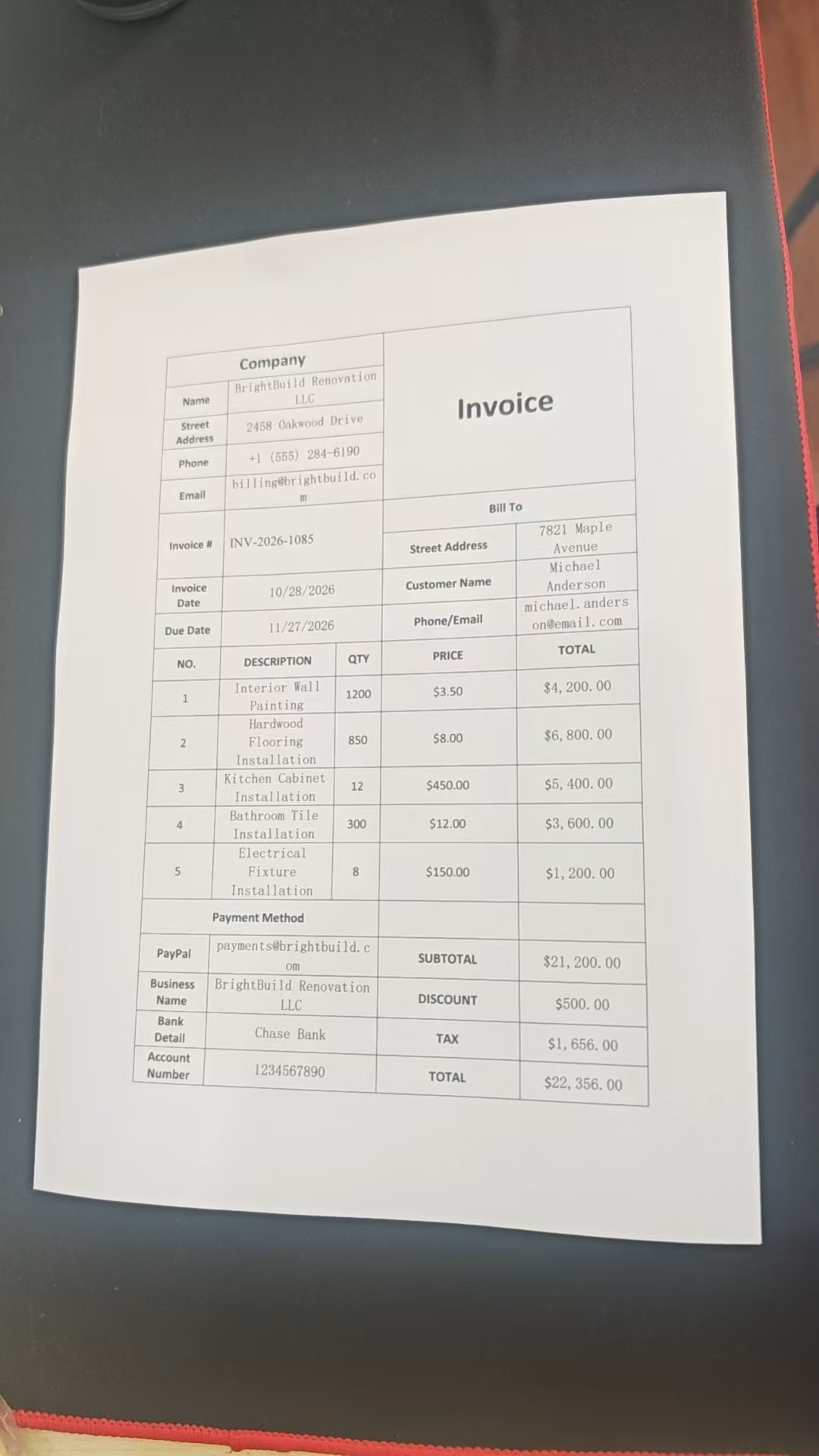
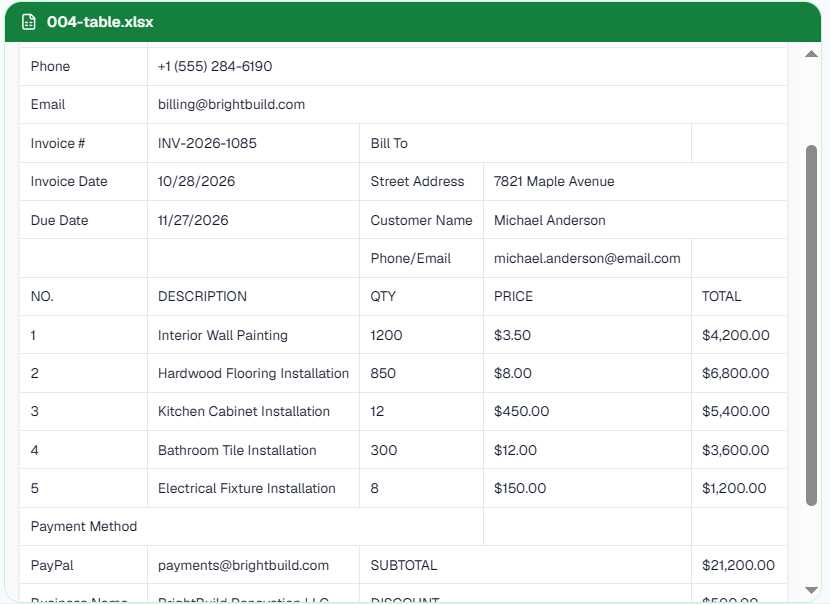
Tables. Tables come out as rows and columns, ready to become a spreadsheet. Finance teams can follow our bank statement to Excel and invoice data extraction guides.
Formulas and mixed layouts. Text, headings, tables and math on one page.
How Unlimited OCR 2 Handles Tables Across Pages
Long PDFs often split one table over several pages, and page-by-page OCR tends to lose the header row. Unlimited OCR 2 takes every page of a document in one request, in page order. A Baidu team member has said that a table running across pages comes back as a single table. Still check the totals on very long files: Baidu notes that splitting huge documents into chunks loses some document-wide context.
Turn Unlimited OCR 2 tables into Excel
Unlimited OCR 2 itself returns tables as Markdown or HTML. This page converts them for you: click Download Excel to get an .xlsx file with rows and columns kept. For other workflows, use our image to Excel converter or PDF to Excel converter.
Unlimited OCR GitHub, Hugging Face and Baidu AI Cloud
GitHub: baidu/Unlimited-OCR holds the code, the technical report and both versions.
Hugging Face: baidu/Unlimited-OCR-2 holds the weights. Baidu's Unlimited OCR 2 Space accepts up to 8 pages per request on shared GPUs.
Baidu AI Cloud: Baidu sells a separate, hosted document parsing API based on Unlimited OCR 2, with its own account and pricing.
Can You Run Unlimited OCR 2 Locally? (GPU, Mac, GGUF)
Yes, but Baidu's supported path needs an NVIDIA GPU:
Transformers: load
baidu/Unlimited-OCR-2withtrust_remote_code=Truein bfloat16, then callinferfor one page orinfer_multifor a list of page images. Baidu tested this on an 80 GB A800.SGLang: serve an OpenAI-compatible
/v1/chat/completionsendpoint. PDFs are converted to page images with PyMuPDF first.
Small GPUs struggle: one tester's 15-page Unlimited OCR 2 run on an 8 GB laptop GPU never finished. Baidu has not added Mac support yet, but the community has published Unlimited OCR 2 GGUF quantizations (about 2 to 6 GB) and run it with mlx-vlm. If you have no suitable GPU, the tool on this page is the simplest option.
Why Run Unlimited OCR 2 Online?
Unlimited OCR 2 is Baidu's open-source model aimed at long documents. Self-hosting needs a large GPU and setup time. This page gives you online extraction to Excel without installing anything. The live converter uses our document-extraction pipeline; it does not guarantee each request loads Unlimited OCR 2 weights.
Unlimited OCR 2 vs PaddleOCR-VL, LightOnOCR and MiniCPM-OCR
Baidu reports that Unlimited OCR 2 scores 84.59 on MPDocBench and 77.06 on MarathonDocBench, a 100 to 300 page benchmark Baidu created, plus 94.02 on single-page OmniDocBench v1.6. These figures are self-reported.
Early community feedback on Unlimited OCR 2 is mixed. On Reddit, the most-asked question was how it compares with PaddleOCR-VL, and one tester found LightOnOCR3 clearly better on French legal documents.
A simple rule: choose Unlimited OCR 2 for very long, multi-page documents. Choose a small single-page model such as MiniCPM-OCR or LightOnOCR for speed or non-English pages.
Is Unlimited OCR 2 free for commercial use?
The model is. Unlimited OCR 2 is released under the MIT license, copyright Baidu. This online tool follows the same free credits and plans as the rest of ImageToExcel.
Limitations to keep in mind
Handwriting is weak. Community testers report misread terms and repeated output on handwritten pages.
Non-English support is limited. Baidu only says "multilingual" and has not published a list. Turkish is on Baidu's roadmap, and testers report weaker results on French, Arabic and Hebrew.
Very long files can lose context. Chunking long files can make heading levels less accurate.
Rotated pages. Turn scans upright before you upload.
For better results, upload flat, upright pages in reading order, and check totals and dates before you use the numbers.
FAQ
Where can I find the Unlimited OCR 2 code and weights?
The code is on GitHub at baidu/Unlimited-OCR and the weights are on Hugging Face at baidu/Unlimited-OCR-2.
Is Unlimited OCR 2 the same as Baidu AI Cloud OCR?
No. Unlimited OCR 2 is a free, open-source model. Baidu AI Cloud sells a separate commercial document parsing API built on it, with its own account, limits and pricing.
Is Unlimited OCR 2 online free?
You can try online extraction with a free account and limited daily credits. Sign in is required to upload and convert. Buy more credits when you need higher volume.
What files and sizes can I upload?
JPG, JPEG, PNG, WEBP and PDF. Upload limits depend on your account, and page limits can vary by plan.
Does Unlimited OCR 2 work with scanned PDFs?
Yes. Upload the PDF and the model reads all its pages in order, which helps tables that run across pages stay together. Or try our PDF OCR tool.
Can I run Unlimited OCR 2 with Ollama or on a Mac?
Baidu lists only Transformers and SGLang on NVIDIA GPUs. Community GGUF files and mlx-vlm runs exist. This page works on any device with a browser.
How does Unlimited OCR 2 handle handwriting and rotated scans?
Printed text works best. Testers report weak handwriting; rotate scans upright first.
Can Unlimited OCR 2 extract images from a document?
Baidu documents text, table and layout output in Markdown. Exporting embedded pictures as separate files is not supported.
How do I check whether the output is right?
Compare key numbers with the source before you rely on them, especially totals, dates and IDs.
Are my files private?
Uploaded files are processed to provide the OCR you request, as described in our Privacy Policy. For fully offline use, run the open weights yourself.
Which model should I choose?
Choose Unlimited OCR 2 for long multi-page documents, and a smaller single-page model for speed or limited hardware.
Run Unlimited OCR 2 Online
Upload an image or PDF and get text and Excel in one click.